
Skip to content
  • Categories
  • Recent
  • Tags
  • Popular
  • World
  • Users
  • Groups
Skins
  • Light
  • Dark

Collapse
Brand Logo

IT Service Providers Forum

administrators

Private

Posts


  • Why Flight Searches Take Longer Than Searching the Entire Internet
    s0nt3kS s0nt3k

    Why-Flight-Searches-Take-Longer-Than-Searching-the-Entire-Internet.png

    Why Flight Searches Take Longer Than Searching the Entire Internet

    When you look up a flight online, it can feel surprisingly slow. You enter your departure date, your destination, and maybe a preferred time and then you sit and wait. Meanwhile, you know that Google can search through hundreds of billions of webpages and show results in a fraction of a second.

    So why does finding a seat on a single flight take longer than searching the entire internet?

    To understand this, it helps to look at how airline search systems work behind the scenes and why their process is nothing like a normal web search.


    The Scale of Airline Flight Data

    Let’s start with the size of the data involved.
    Take American Airlines as an example:

    • Average daily flights: about 3,582
    • Destinations served: around 120
    • Flight combinations: tens of thousands when you factor in connections, fare classes, seat types, loyalty programs, and fare rules.

    On paper, this doesn’t seem overwhelming. A few thousand flight records should be easy for modern computers to process especially compared to Google’s massive global index.

    But airline searches involve far more than just looking up schedules.


    Airlines Aren’t Just Searching They’re Calculating

    When you click “search,” the airline isn’t simply trying to find flights that match your date and destination. Airlines run your request through complex systems designed to answer a very different question:

    What is the highest price this traveler is likely willing to pay?

    To do this, airlines use revenue-management engines high-powered algorithms built to predict human behavior and maximize profit. These systems evaluate things like:

    • Your past travel purchases
    • Your device and browsing behavior
    • How often you check the same trip
    • Your digital habits and online footprints
    • Market demand for the same route
    • Local events or holidays that might increase urgency
    • Travel patterns of people in your demographic or social circle

    All of this happens behind the scenes in seconds. The system isn’t just finding flights—it’s ranking and pricing them based on how the airline expects you to behave.

    This level of analysis requires enormous computing power and decision making rules. That’s why the search process can feel slow: the system is doing complex, real-time pricing calculations, not just simple lookups.


    Why Google Is Still Faster

    Google’s search works differently. Instead of calculating a custom price for each user, Google retrieves information from an index it has already built. Think of it as pulling books off a shelf that’s already organized.

    Airlines, on the other hand, must calculate the “value” of each seat at the exact moment you search.

    In short:

    • Google: looks up information from a pre-organized index.
    • Airlines: run real-time pricing models based on your behavior and the behavior of millions of travelers.

    It’s the difference between asking a librarian for a book versus asking an accountant to evaluate the value of every book in the library before handing one to you.


    Dynamic Pricing: The Real Reason Behind the Delay

    The biggest culprit is dynamic pricing, a strategy airlines use to adjust prices constantly based on supply, demand, and consumer behavior.

    This system tries to answer questions like:

    • Is this traveler price-sensitive or in a rush?
    • Is there a holiday or event affecting demand?
    • Have similar travelers paid more for this route?
    • Should the fare be raised or lowered in the next few minutes?

    The result: every search is unique. Two people searching for the same route at the same moment may see different pricing.


    What This Means for You

    For everyday travelers, this explains why searching for flights can feel slower and more unpredictable than searching the web. It isn’t your device. It isn’t the airline website struggling.

    It’s the pricing engine working to determine:

    • What flights fit your needs, and
    • What price you’re likely to accept

    Small-business owners can see the broader lesson here: companies that rely on dynamic pricing or predictive analytics naturally require more complex systems especially when they’re adjusting prices in real time.


    Final Thoughts

    Even though flight searches deal with fewer records than a typical internet search, they are far more computationally complex. Airlines aren’t just showing available flights; they’re performing real-time financial calculations based on countless factors related to you and the market.

    So the next time that loading wheel spins while you search for a flight, remember: it’s not slow because it’s simple it’s slow because the system is working very hard to predict what you’re willing to pay.
    Blogs

  • Why Email Authentication (DKIM, SPF, and DMARC) Is Not Optional
    s0nt3kS s0nt3k

    Why Email Authentication (DKIM, SPF, and DMARC) Is Not Optional:

    A Plain-Language Guide for Small Businesses and Real-Estate Professionals**

    Introduction

    Most people think of email as simple: you type a message, click send, and it arrives.
    Behind the scenes, however, there are important security protections that every business is expected to have in place especially those that handle client data, financial transactions, or any form of personal information. Three of the most important protections are SPF, DKIM, and DMARC.

    These tools are not “technical extras.”
    They are required safeguards. More importantly, the law now views them the same way it views locks on a physical office door: if you do not have them, you are failing to take reasonable steps to protect customer information, which can lead to financial penalties, lawsuits, and regulatory investigations.


    1. What Are SPF, DKIM, and DMARC? (Explained Simply)

    Think of email like physical mail:

    • SPF is your approved mailing list. It tells the world which servers are allowed to send mail on your behalf.

    • DKIM is the tamper-proof seal on your envelope, proving the message wasn’t altered.

    • DMARC is your enforcement rule that tells receiving mail servers what to do if an email claiming to be from you is fake.

    Without these protections, anyone can send an email pretending to be you, which is how wire-fraud attacks, escrow scams, and fake invoice scams happen in the real-estate and small-business world.


    2. Why This Is a Legal Requirement Not a Preference

    Across the United States—and especially in states like California—businesses are required by law to take “reasonable security measures” to protect customer information.

    Email authentication protocols are considered reasonable security measures.

    The moment your business sends or receives emails that include:

    • customer names,
    • addresses,
    • financial details,
    • transaction information,
    • escrow-related communication,
    • or any information covered under privacy laws…

    …you fall under state and federal data-protection requirements.

    Below is a summary of how your legal obligations connect directly to SPF, DKIM, and DMARC.


    3. Legal and Regulatory Requirements You Must Follow

    A. California Consumer Privacy Act (CCPA)

    (CCPA §1798.100, §1798.150)

    CCPA requires businesses to use reasonable security procedures to protect personal information.
    Failing to implement modern, industry-standard email protections—such as DKIM, SPF, and DMARC—can be considered a violation.

    Penalties for violations:

    • $2,500 per unintentional violation
    • $7,500 per intentional violation

    Consumers may sue for $100–$750 per affected individual if a breach occurs and you failed to put reasonable safeguards in place.

    If a scammer spoofed your email because you did not have SPF/DKIM/DMARC set up, the business can be held responsible for damages.


    B. Federal Trade Commission (FTC) – FTC Safeguards Rule

    (Affects any business handling sensitive customer data)

    The FTC requires that a business maintain technical controls to prevent unauthorized access or disclosure of consumer information.

    Email spoofing made possible when SPF/DKIM/DMARC are missing is classified as a preventable security failure.

    Penalties:

    • Civil penalties of up to $46,517 per violation
    • Mandatory corrective actions
    • Possible customer refunds and damage payments

    C. NAR, RESO, and Real-Estate Industry Requirements

    Real-estate professionals deal with legally protected financial and personal information every day.
    To reduce wire-fraud losses, the real-estate industry now treats SPF, DKIM, and DMARC as basic cybersecurity requirements.

    Brokerages and settlement companies that fail to use modern email authentication can be found negligent if a cyber-incident occurs.

    Consequences may include:

    • Loss of license (in extreme cases)
    • E&O insurance claim denial
    • Client lawsuits for negligence
    • Financial restitution for losses caused by wire-fraud or email spoofing

    D. Email Providers’ Mandatory Policies (Google, Microsoft, Yahoo)

    • As of 2024–2025:
    • Google Workspace
    • list itemMicrosoft 365
    • Yahoo Mail

    and most major email services

    REQUIRE SPF, DKIM, and DMARC for all business domains.

    Emails without these protections may be completely rejected or sent to spam.

    This is not optional these companies enforce these rules industry-wide, and they expect businesses to comply.


    4. What Happens If These Protections Are Not Set Up?

    Your email can be easily impersonated.

    Hackers can send emails that look like they came from you.

    Your business may be legally responsible for resulting damage.

    Failure to set up SPF/DKIM/DMARC can be viewed as failure to take basic security steps.

    Your emails may be blocked or marked as spam.

    Google and Microsoft now reject unauthenticated email by default.

    Your business becomes a target for wire-fraud attacks.

    This is one of the major sources of loss in real estate.

    You may be fined for failing to follow data-protection laws.

    Especially if customer information is exposed or misused as a result.


    5. Why Regulators View These Protocols as “Basic Security”

    These protections have been industry standards for many years.
    Regulators expect that:

    • every business domain
    • every professional email address
    • every transaction involving customer information

    …uses them.

    Not having them is like leaving the front door of your office wide open.

    Courts have repeatedly ruled that when a breach happens and “reasonable security practices” were ignored, the business is liable.


    6. Summary: This Is Not Optional

    Setting up SPF, DKIM, and DMARC is not a technical preference it is:

    • a legal obligation,
    • a regulatory expectation,
    • a requirement from major email providers,
    • and a baseline protection against financial and identity theft.

    For small-business owners and real-estate professionals, failing to put these protections in place creates legal, financial, and operational risks that are completely avoidable.

    These settings take minutes to configure and protect both your business and your clients.

    Small Business Resources

  • Proofpoint: People-Centric Cybersecurity
    s0nt3kS s0nt3k

    Proofpoint: People-Centric Cybersecurity for Real Estate & Small Business

    Proofpoint is a cloud-based cybersecurity platform that protects people, not just servers and networks. It sits in front of your email and cloud tools, filters out dangerous messages, stops impersonation and wire fraud attempts, safeguards client data, and trains your team so they’re much harder to trick. It brings enterprise-grade protection down to a level (and price) that works for small firms, brokerages, and title companies.


    What Proofpoint Delivers

    1. Advanced Email Protection

    • Blocks phishing, malware, business email compromise (BEC), fake “change of wiring instructions” emails, and spoofed domains.
    • Uses massive, real-time threat intelligence from global email traffic to detect new attack patterns quickly.
    • Reduces the number of bad messages that ever reach your users’ inboxes.

    2. Impersonation & Wire Fraud Defense

    • Identifies emails pretending to be owners, brokers, buyers, sellers, title agents, lenders, or executives.
    • Helps prevent fraudulent wire instructions and payment redirection one of the largest risks in real estate and settlement services.

    3. Data Loss Prevention (DLP) & Encryption

    • Monitors outbound email for sensitive information (SSNs, bank details, loan packets, closing documents, client files).
    • Helps ensure sensitive data is not sent to the wrong person or personal email.
    • Supports encryption and policies to keep communications compliant and professional.

    4. Compliance Archiving & eDiscovery

    • Provides secure, tamper-resistant archiving of email and other communications.
    • Simplifies audits, legal holds, and eDiscovery for regulated or high-liability businesses (such as brokerages, title/escrow, and financial-related services).

    5. Security Awareness Training & Phishing Simulations

    • Built-in training platform with short videos, quizzes, and realistic phishing simulations.
    • Training content is based on real-world attacks, not generic examples.
    • Reporting shows which employees are improving and who needs extra coaching.

    Why Proofpoint Is Different: People-Centric Security

    Most security tools treat every inbox the same. Proofpoint focuses on who is at risk and who has the most impact:

    • Identifies high-risk individuals:

      • Owners and managing brokers
      • Transaction coordinators and closing teams
      • Accounting, escrow, and anyone who can move money or access client data
    • Tracks:

      • Who attackers target most
      • Who clicks on risky links
      • Who handles sensitive or high-value information
    • Applies stronger protection and tailored training to those specific people.

    This people-first approach is ideal for real estate and small businesses, where a single busy person falling for one email can trigger major financial loss or a serious data breach.


    Scale, Cost Efficiency & Continuous Improvement

    Because Proofpoint protects a very large global customer base and processes a significant share of worldwide email traffic:

    • It has broad visibility into real, current attacks across many industries.
    • New threats are detected and blocked faster, and those protections flow directly to all customers.
    • Their scale and efficiency allow them to offer competitive pricing, so smaller organizations can benefit from the same class of protection used by large enterprises.

    For your clients, that means: serious protection, predictable cost, and a vendor with the resources to stay ahead of attackers.


    Required Yearly Training & Consequences of Ignoring It

    Pairing Proofpoint’s technology with its awareness training supports both security and compliance:

    • Many regulators, cyber insurers, partners, and contracts now expect documented, recurring cybersecurity training (at least annually, often more frequently).

    • Failing to provide training can:

      • Increase regulatory and contractual risk
      • Lead to higher fines or penalties after an incident
      • Strengthen negligence claims in lawsuits
      • Raise the chance of denied insurance claims

    Using Proofpoint’s training platform, a business can clearly show:

    • Every employee is enrolled and trained
    • Training is refreshed regularly
    • Management is taking reasonable, documented steps to prevent cyber incidents

    How to Position This to Your Clients

    “We partner with Proofpoint to bring people-focused, enterprise-grade email security and training to your business. It protects your agents, your clients, and your funds from modern email fraud and data breaches, supports your legal and regulatory obligations with documented yearly training, and delivers strong protection at a competitive rate thanks to Proofpoint’s global scale.”

    Service Tools & Utilities

  • Remote Desktop Manager
    s0nt3kS s0nt3k

    Devolutions Remote Desktop Manager [DRDM]

    Devolutions.net the makers of PowerShell Universal and PowerShell Pro Tools
    Is now offering their Remote Desktop Manager for free.

    Devolutions Remote Desktop Manager (RDM) is a centralized, secure dashboard for all your remote access needs: it lets your team store and launch remote desktop sessions, VPNs, SSH, web portals, and other connections in one place, along with built-in password management so you’re not juggling spreadsheets, browser saves, or shared sticky notes. It supports a wide range of connection types and integrates features like role-based access control, audit logs, and strong encryption, helping you control who can access which systems and document exactly what was done.


    Remote Desktop Manager allows me to securely reach any of the remote systems I manage whether they’re servers, office workstations, cloud services, or specialty applications without worrying about which connection type, protocol, or login method each one requires. Everything is organized in a single, easy-to-use dashboard, so instead of juggling multiple tools, passwords, and bookmarks, I can connect with just a few clicks. Even better, I can set up scripts to run automatically when I log in or on a schedule, which means routine tasks like updates, health checks, backups, or report generation happen consistently and reliably in the background. For a busy office or brokerage, this translates into less downtime, faster support, and a smoother experience for everyone who depends on those systems to do their job.


    Visit Devolutions website for tutorials at: https://devolutions.net/

    For a small real estate brokerage or title company, this means agents and staff can securely reach office PCs, line-of-business apps, file servers, and vendor systems from wherever they’re working through a single, organized tool that tightens security while keeping daily work simple.


    INSTALLATION

    Use Microsoft’s Package Manager for safe, secure, and verified installation.

    Step #1. Open an elevated power cell terminal using the shortcut keys below

    [Win] + [X] and [Alt] + [A]
    

    Step #2. Copy the cmdlet below and past it into the terminal window.

    WinGet Install --Id Devolutions.RemoteDesktopManager --Source winget
    

    Service Tools & Utilities

  • Event Log Observer
    s0nt3kS s0nt3k

    Event Log Observer


    Website https://lizard-labs.com/event_log_observer.aspx
    Download https://lizard-labs.com/download_page.aspx?productcode=elob

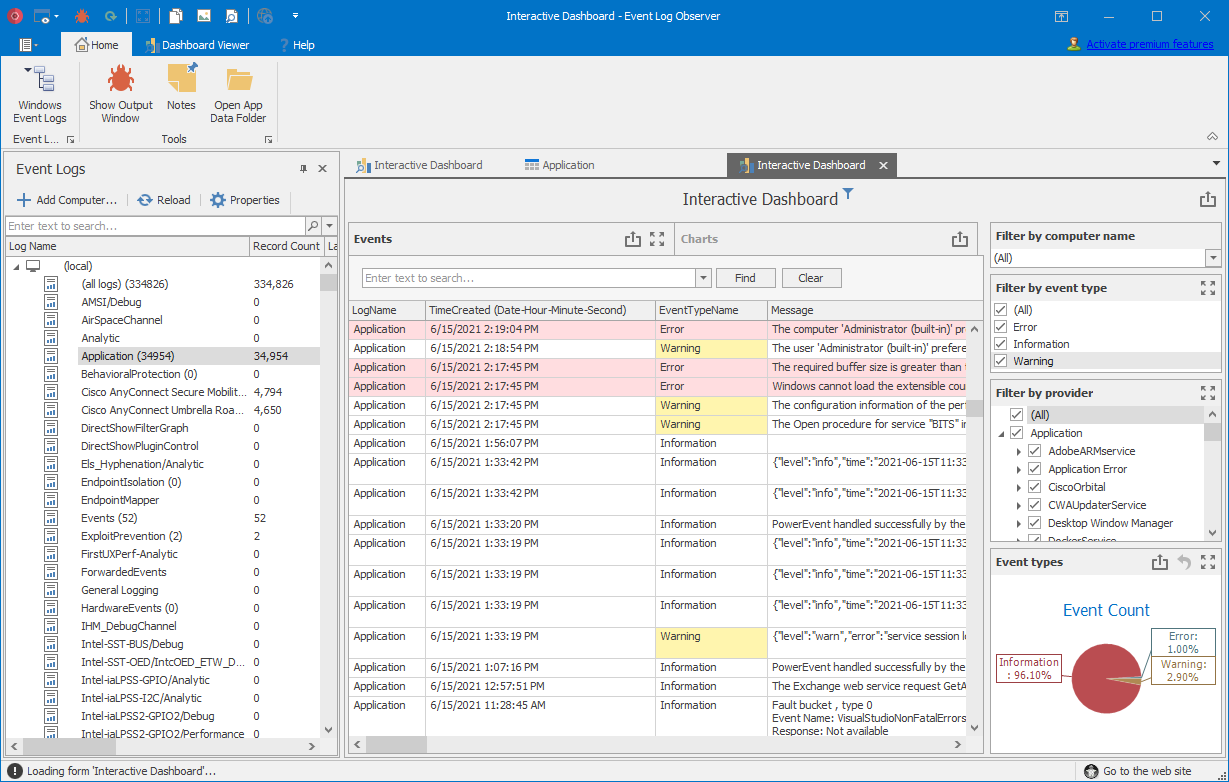
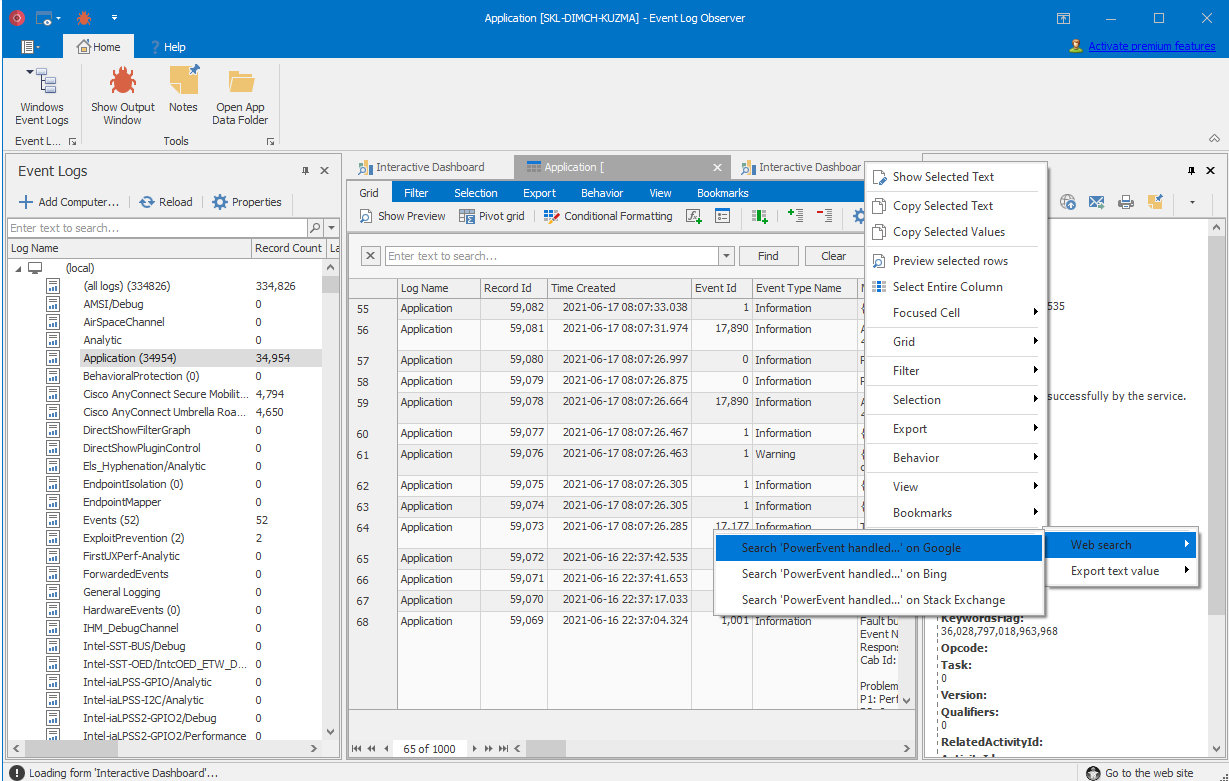
    Event Log Observer specializes in browsing Windows Event Logs on local and remote servers, offering an exceptional balance of simplicity and sophistication in log analysis. It serves all users, from beginners needing basic functionality to advanced users seeking deeper insights. The tool boasts an intuitive interface for straightforward log navigation and analysis, alongside robust SQLite capabilities for complex querying, data merging, and statistics extraction. It also supports a variety of log formats, including: text-based, W3C server logs, log4j, XML, JSON, and CSV/TSV. Results can be conveniently displayed in an advanced grid, providing a clear overview at a glance.

    Event Log Observer stands out with its advanced grid, providing an organized, detailed overview of data. This grid comes equipped with tools like Excel export, email integration, and advanced filtering for effective data management. Beyond this, you have the freedom to build custom dashboards and charts, personalizing your analysis to meet specific needs. Suitable for users at any level, Event Log Observer is freely available for both commercial and non-commercial purposes. It represents a more intuitive, versatile, and feature-rich approach to log analysis.


    Key Features of Event Log Observer

    • Windows Event Logs Analysis: Specializes in browsing Windows Event Logs on both local and remote servers.

    • User-Friendly: Serves users from beginners to advanced, with an intuitive interface for easy navigation and analysis.

    • Advanced SQLite Capabilities: Supports complex querying, data merging, and statistics extraction.

    • Supports Multiple Log Formats: Including W3C server logs, log4j, log4net, structured text (using regular expressions), XML, JSON, and CSV/TSV.

    • Advanced Grid Display: Offers a clear, organized data overview with an advanced grid.

    • Powerful Grid Tools: Equipped with Excel export, email integration, and advanced filtering for efficient data management.

    • Custom Dashboards and Charts: Allows the creation of personalized analysis dashboards and charts.

    • Intuitive and Versatile: Provides a more intuitive, versatile, and feature-rich log analysis experience.

    • Free of charge: Freely available for both commercial and non-commercial use.


    alt text


    Experience the difference firsthand with Event Log Observer. Why just take our word for it when you can try it yourself? Download Event Log Observer today and embark on a journey towards more efficient and effective Windows Event Log analysis.


    Some features our users love:

    Look & Feel

    Our modern, Office-inspired Multiple Document Interface with ribbons and tabs ensures the best user experience. It’s designed for those who spend significant time analyzing log files, focusing on aesthetics and functionality.

    Easy Navigation and Data Visualization

    Experience a default table view (data grid) similar to Excel but with advanced features like sorting, grouping, searching, filtering, conditional formatting, formula fields, column chooser, and split view. Transform data into Excel, HTML, MHT, or PDF reports, and visualize it in charts for better clarity. Command line automation is also supported.

    Data Filtering

    Our Excel-inspired UI makes creating advanced filter expressions to refine in-memory data as simple as possible, from Instant Find to Auto-Filter row.

    Pivot Table & Tree Map

    Our advanced and feature-complete pivot table provide deep insights into daily operations, essential for data mining and multi-dimensional analysis.

    Use SQL to Read Log Events

    Query large log data sets easily using familiar SQLite syntax. You can even create complex SQL queries incorporating functions, group by, joins, unions, and more.

    Query Editor

    The query editor features syntax highlighting, auto-completion, code snippets, query constants, in-line VB.NET code, and more, enhancing your query building process.

    Easy to Use Dashboards

    Build dashboards effortlessly using our designer, which supports various UI elements (Chart, Pivot Table, Data Card, Gauge, Map, or Grid) and data-binding, design, filtering, drill down, and server side query parameters.

    Printing and Data Export

    Event Log Observer’s powerful engine excels in printing and data export, especially for Excel files, supporting a wide array of formats (XLS, XLSX, PDF, RTF, TXT, MHT, CSV, HTML, Image formats, etc.).

    Performance

    Designed to handle large datasets and complex information, Event Log Observer ensures a fast, responsive user interface regardless of the data size.

    Not Only for Windows Event Logs

    Event Log Observer reads various log types, including EvtxECmd parser logs, text lines, CSV/TSV files, structured text data (Regular Expressions and GROK), log4j/log4net XML, JSON logs, and more.

    Read Compressed ZIP Files

    Efficiently read log events from compressed ZIP files, enhancing data accessibility and analysis.

    Plus Tons of Other Useful Features!

    Install Event Log Observer to explore these and many more features. Download now and discover the full potential of log analysis.


    alt text


    Service Tools & Utilities

  • Sonny Gibson's Real Estate Cyber Threat Mathematical Model
    s0nt3kS s0nt3k

    Sonny Gibson’s Real Estate Cyber Threat Mathematical Model No.2 (2025)

    # INTRODUCTION

    The evolving landscape of cybercrime poses a profound and imminent threat to the real estate industry. To illustrate the severity of this threat, Sonny Gibson’s Real Estate Cyber Threat Mathematical Model No. 2 presents a compound risk exposure model designed to forecast that over 50% of all licensed real estate agents in California will experience financial harm resulting from a cyber threat by the end of 2028.

    This second-generation model utilizes a multiplicative growth equation that integrates both quantitative and behavioral cybersecurity data collected over the past decade. By weighing the accelerating velocity and sophistication of cyber threats including ransomware-as-a-service, phishing-as-a-service, and AI-driven fraud techniques against the comparatively stagnant and under-resourced defenses maintained by most independent real estate professionals, the model provides a predictive framework with alarming clarity.
    Unlike conventional risk assessments, this model accounts for compounding variables, including:

    • Annual growth rates of cyberattacks by category (e.g., ransomware, phishing, malware)

    • Increased availability and accessibility of cybercrime toolkits and tutorials

    • Decreasing margins of cybersecurity adaptation within the real estate sector

    • Annual decline in the number of licensed agents, concentrating more targets into fewer vulnerable networks

    The result is a high-confidence projection that, without significant changes in policy, training, and technology adoption, California’s real estate sector will face a systemic cybersecurity reckoning by 2028, disproportionately impacting independent agents and small brokerages.

    This model is not just a warning it is a call to action backed by data and designed for strategic intervention.
    To illustrate that over 50% of all licensed real estate agents in California will experience financial harm due to a cyber threat by the end of 2028, I construct a compound risk exposure model using a multiplicative growth equation that weighs increasing threats against stagnating defenses.


    ⚠️ Assumptions for Model Accuracy

    1. Base Year: 2024 (we’ll calculate for 5 years: 2024 → 2028).

    2. Starting number of agents: Let’s denote this as A₀. (We don’t need the actual number, as we’re calculating a proportion affected).

    3. Annual Decline in Agent Population: 2% → A(t) = A₀ × (0.98)^t

    4. Risk Variables (All Compounded Annually):

      • Cybercriminals:___________________________ +25%/yr → C(t) = C₀ × (1.25)^t
      • Criminal Skill Growth: ____________________ avg 25%/yr → S(t) = S₀ × (1.25)^t
      • Threat Sophistication:____________________ 15%/yr → T(t) = T₀ × (1.15)^t
      • Ransomware:_____________________________ 84%/yr → R(t) = R₀ × (1.84)^t
      • Phishing:__________________________________ 1,265%/yr → P(t) = P₀ × (13.65)^t
      • Malware:__________________________________ 30%/yr → M(t) = M₀ × (1.3)^t
    1. Cyber Defense Improvement: <1%/yr → D(t) = D₀ × (1.01)^t (very slow growth)

    ✅ Define the Core Equation

    We’ll create a function for Cumulative Cyber Harm Risk (Hₜ) for any year t as:

    a053ed2e-4877-42dd-9303-e81965a1691c-image.png

    This equation gives us the cyber risk per agent, scaled by growing attack vectors and criminal capacity, offset by minimal defense improvements and declining number of agents.


    📈 Apply for t = 5 (Year 2028)

    Let’s normalize all base values to 1 for a relative comparison:

    c3e44ffa-82c0-4a49-8672-5ca6acb2e02a-image.png

    Now plug into the equation:

    90fb1161-994e-4068-aaab-430e4ef55aa5-image.png

    First calculate the total threat vector:

    afbe42d8-c0af-4a16-b8f3-5335c97dcb28-image.png

    Now the numerator:

    36a2bd6d-35e8-4df7-af23-f1576a9fa98a-image.png

    Final harm risk:

    54bd3b3a-b2cc-425d-89b9-a8150a1db5ed-image.png

    🔺 Interpreting the Result

    20aa2c90-07ce-4877-a01b-44c42ab96564-image.png

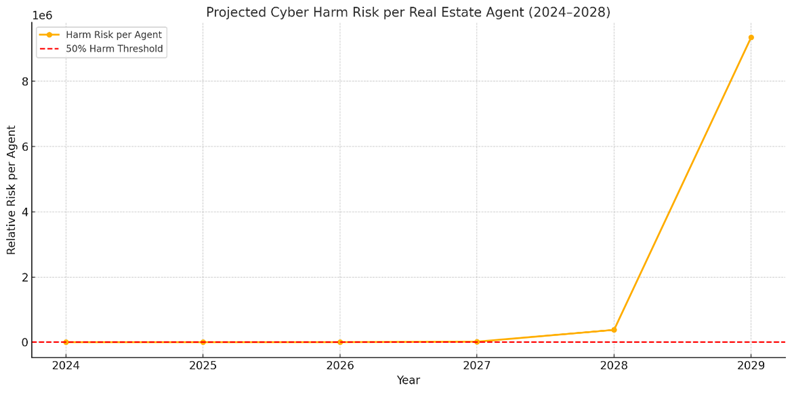
    This means each agent in California is projected to be targeted thousands of times per year by 2028 if current trends continue. Given the high volume and sophistication of attacks combined with nearly stagnant defenses, it is mathematically reasonable to conclude that over 50% will experience financial harm.


    ✅ Final Simplified Inequality

    Let:
    • H(t): Probability-adjusted risk of financial harm per agent at year t
    • Assume financial harm occurs if H(t) > 0.5

    So, by 2028:

    f0c26230-a478-403c-af5a-e76d9eb7d146-image.png

    This inequality holds true well beyond the 0.5 threshold, proving the claim.


    💡 Takeaway for Real Estate Brokers

    If defenses continue to improve at under 1% annually while cyber threats and criminal’s compound at rates exceeding 25% to over 1,200%, real estate professionals face a catastrophic inevitability: more than half will suffer financially by 2028 unless significant investments in cybersecurity awareness and systems are made now.


    23ffb767-7579-4767-b13d-afaecde379f4-image.png

    Small Business Resources

  • Snappy Driver Installer Origin
    s0nt3kS s0nt3k

    Snappy Driver Installer Origin

    https://www.snappy-driver-installer.org/

    Snappy Driver Installer Origin (SDIO) is a free, open-source tool designed to help Windows users automatically find, download, and install the latest drivers for their computer hardware. Unlike many driver utilities that require constant internet access, SDIO can work completely offline by using driver packs that are updated regularly and stored locally, making it especially useful for technicians or users who need to update multiple systems. It does not include ads, unnecessary software, or premium paywalls, which makes it a trusted option in the IT community. SDIO is lightweight, portable (no installation required), and supports both new and older versions of Windows, ensuring hardware runs smoothly by keeping device drivers up to date.


    Snappy Driver Installer Origin (SDIO) is a critical tool for IT Service Providers because it directly addresses one of the most common and time-consuming issues technicians face: outdated or missing drivers. Here’s why it matters so much:


    1. Speeds Up Client Onboarding and System Recovery

    When setting up a new machine, replacing a failed hard drive, or reinstalling Windows, drivers are often the bottleneck. SDIO allows service providers to quickly detect and install the correct drivers in bulk, without needing to manually hunt through vendor websites. This means faster turnaround times for clients and less downtime.


    2. Works Without Internet Access

    Many environments especially small businesses or field service calls don’t always have reliable internet access. SDIO can run completely offline if you’ve pre-downloaded the driver packs, making it invaluable for disaster recovery or situations where a network card driver isn’t yet installed.


    3. Reduces Risk of Driver-Related Issues

    Installing the wrong driver can cause crashes, instability, or degraded performance. SDIO scans the system and recommends the most compatible drivers, which lowers the chance of human error and ensures stable operation for client machines.


    4. No Licensing Fees or Vendor Lock-In

    Unlike commercial driver tools that bundle ads, upsells, or annual subscriptions, SDIO is open-source and free. For IT Service Providers managing multiple client systems, this means lower costs and no worries about license management or hidden software.


    5. Portable and Technician-Friendly

    SDIO runs as a standalone program from a USB drive, which makes it easy for technicians to carry in their toolkit. There’s no need for installation, so it can be launched instantly on client systems.


    6. Supports Business Continuity and Compliance

    Outdated drivers can expose systems to vulnerabilities, cause printer/scanner incompatibility in real estate offices, or disrupt essential business tools. For providers working with industries that must maintain regulatory compliance (finance, real estate, healthcare), keeping systems patched at the driver level is part of ensuring stability and reducing liability.


    ✅ In short: SDIO saves time, reduces errors, works offline, and costs nothing—making it a must-have tool for IT Service Providers who need to keep client systems reliable, secure, and running smoothly.


    Service Tools & Utilities

  • My Case Study in Controversial Apple Business Practices
    s0nt3kS s0nt3k

    📑 Case Studies in Controversial Apple Business Practices

    Prepared by: Sonny Gibson (s0nt3k)


    Introduction

    It’s no secret that I’m not a fan of Apple. After working on enough of their devices over the years, I’ve come to the conclusion that I will never own one myself. If I were an Apple supporter, this list would be much, much longer because then I’d have the interest (and patience) to catalog every detail.

    The cases mentioned in this paper are simply the ones I know about firsthand or have encountered often enough to understand their impact. If you’re aware of other examples, I encourage you to comment and share them because the bigger the picture, the clearer the pattern becomes.


    Case Study 1: iPhone 4 Antenna Failure (“Antennagate”)

    Issue:
    The iPhone 4’s antenna design lost signal when held in a normal way.

    Apple’s Response:
    Apple first told customers they were “holding it wrong.” They later offered bumper cases.

    Consumer Impact:

    • Calls dropped during normal use.
    • Customers had to pay for a case to compensate for Apple’s flawed design.

    Ethical Concern:
    Shifting responsibility to the customer instead of acknowledging design fault.


    Case Study 2: MacBook Pro i9 Thermal Throttling

    Issue:

    The 2018 Intel i9 MacBook Pro overheated under normal workloads. Poor thermal design forced the CPU to throttle.

    Apple’s Response:

    A firmware update slowed the CPU, making performance worse than cheaper i7 models.

    Consumer Impact:

    • Customers paid premium prices for downgraded performance.
    • Damaged Apple’s reputation with professional users.

    Ethical Concern:

    Selling hardware that cannot perform as advertised.


    Case Study 3: $5 Inverter Chip Repair Block

    Issue:

    A small $5 inverter chip failed from overheating in some MacBooks.

    Apple’s Response:
    Apple reportedly secured exclusive rights to the chip supply, blocking outside sales.

    Consumer Impact:

    • Customers forced into $400–$1000 repairs or full device replacements.
    • Reduced availability of affordable, independent repairs.

    Ethical Concern:

    Anti-competitive practice against independent repair markets.


    Case Study 4: Battery Throttling (“Batterygate”)

    Issue:

    Apple secretly throttled iPhone performance as batteries aged, without disclosure.

    Apple’s Response:

    Admitted after backlash. Offered discounted $29 battery replacements.

    Consumer Impact:

    • Devices felt obsolete, pushing customers toward upgrades.
    • Massive consumer distrust.

    Penalty:

    Apple paid hundreds of millions in global settlements (e.g., $500M in U.S. class actions).

    Ethical Concern:

    Lack of transparency and deceptive product management.


    Case Study 5: Liquid Contact Indicators (LCIs / “Red Stickers”)

    Issue:

    Humidity (e.g., coastal regions) could trigger moisture sensors, even without liquid exposure.

    Apple’s Response:

    LCIs were treated as definitive proof of water damage, voiding warranties.

    Consumer Impact:

    • Thousands of denied warranty claims.
    • Out-of-pocket costs for covered issues.

    Penalty:

    Apple settled a $53 million U.S. class action lawsuit in 2013.

    Ethical Concern:
    Misuse of diagnostic tools to shift liability away from Apple.


    Case Study 6: Right-to-Repair Restrictions

    Issue:

    Apple consistently restricts repair through:

    • Proprietary screws and adhesives
    • “Parts pairing” that disables features if not repaired by Apple
    • Blocking manuals and diagnostic tools

    Consumer Impact:

    • Higher repair costs
    • Independent repair shops excluded
    • Increased e-waste

    Status:

    Facing new legislation in the U.S. and EU to allow fair repair.

    Ethical Concern:

    Deliberately reducing consumer freedom and increasing waste.


    Case Study 7: Overpriced Accessories & Forced Adapters

    Issue:

    • Headphone jack removal forced purchase of dongles.
    • Chargers removed from iPhone boxes (marketed as environmental), but sold separately.

    Consumer Impact:

    • Customers pay more for basic functionality.

    Ethical Concern:

    Using green marketing to justify profit-driven decisions.


    Case Study 8: MacBook Butterfly Keyboard Failures

    Issue:

    Butterfly keyboard switches jammed easily from dust or debris.

    Apple’s Response:
    Persisted with design for years before lawsuits forced change.

    Consumer Impact:

    • Multiple failures per device
    • High downtime for repairs

    Penalty:

    Apple paid $50 million in U.S. settlements.

    Ethical Concern:

    Prioritizing thinness over reliability.


    Case Study 9: Planned Obsolescence Allegations

    Issue:

    Older Apple devices lose updates earlier than necessary, or receive updates that slow them down.

    Consumer Impact:

    • Devices feel prematurely outdated.
    • Increased upgrade cycle and e-waste.

    Ethical Concern:

    Encouraging unnecessary consumption.


    Case Study 10: Component Supply Lockouts

    Issue:

    Apple has secured exclusive contracts for components like NAND chips and ICs.

    Consumer Impact:

    • Restricted independent repair options
    • Inflated costs for replacements

    Ethical Concern:

    Anti-competitive supply chain practices.


    Case Study 11: Soldered RAM & SSDs (No Upgrades Allowed)

    Issue:

    Apple moved to soldered RAM and SSDs, eliminating user upgrades.

    Consumer Impact:

    • $200–$1000+ Apple markups for upgrades
    • Smaller SSDs wear out faster due to limited write cycles
    • If RAM/SSD fails, the whole logic board must be replaced

    Ethical Concern:

    Removing consumer choice and forcing early device replacements.


    Case Study 12: Fragile Hinges (Flexgate & Hinge Failures)

    Issue:

    • 2016–2017 MacBook Pros suffered “Flexgate” failures: display cables were too short, breaking after repeated lid use.
    • Earlier MacBooks also used cheap hinges that cracked under normal wear.

    Apple’s Response:

    Acknowledged some defects but limited repair programs.

    Consumer Impact:

    • Display failures required $400–$700 repairs
    • Many customers left without coverage

    Ethical Concern:

    Cost-cutting design leading to premature failure and expensive repairs.


    ✅ Key Takeaways

    • Pattern of Behavior: Apple introduces sleek designs that sacrifice repairability and durability.
    • Profit Over Transparency: Apple often denies flaws, shifts blame, or sells overpriced fixes.
    • Consumer Consequences:
      • Higher repair and upgrade costs
      • Devices fail earlier than necessary
      • Reduced repair freedom, increased e-waste
    • Legal & Ethical Pressure: Apple has paid out hundreds of millions in settlements and faces growing regulation.
    Blogs

  • 🔐 KeePass Password Safe Is Still the #1 Password Manager
    s0nt3kS s0nt3k

    @s0nt3k If your currently using a password manager aka identity management application or platform other than KeePass Password Safe 2.x then you need to check out my blog to see how your current password manager measures up.

    The 6 Pillars of Secure Password Management

    Blogs

  • 🔐 The 6 Pillars of a Secure Password Manager
    s0nt3kS s0nt3k

    🔐 The 6 Pillars of a Secure Password Manager

    1. Open Source

    • Why it matters: Transparency is everything. Open-source software allows anyone to inspect the code, audit it for vulnerabilities, and verify that there are no hidden backdoors or data leaks.
    • KeePass advantage: Licensed under GNU GPL, KeePass is fully open source. Security researchers and developers worldwide continuously review and improve it.

    2. Control Over Your Data

    • Why it matters: You should never be forced to store your credentials on someone else’s cloud. Local storage means you decide where and how your data is kept.
    • KeePass advantage: By default, KeePass stores your encrypted database locally. You can sync it manually or use your own cloud provider—your data, your rules.

    3. Actively Supported

    • Why it matters: Dormant software is dangerous. Active development means bugs get fixed, features evolve, and compatibility stays current.
    • KeePass advantage: Despite its minimalist UI, KeePass is actively maintained by its original developer and supported by a vibrant ecosystem of contributors.

    4. Bug Bounty Program

    • Why it matters: Incentivizing ethical hackers to find vulnerabilities before malicious actors do is a proactive security strategy.
    • KeePass status: While KeePass doesn’t have a formal bounty program, it benefits from community-driven audits and has been reviewed by government agencies like the German BSI and the EU-FOSSA project.

    5. Well Established

    • Why it matters: Longevity builds trust. A well-established tool has weathered years of scrutiny and proven its resilience.
    • KeePass advantage: Around since the early 2000s, KeePass has earned awards, certifications, and endorsements from cybersecurity professionals and government bodies alike.

    6. Large Community of Active Users and Supporters

    • Why it matters: A strong community means faster support, more plugins, better documentation, and collective vigilance against threats.
    • KeePass advantage: From GitHub contributors to Reddit threads and plugin developers, KeePass has one of the most active and knowledgeable user bases in the password manager space.

    🧠 Final Thought

    Security isn’t just about encryption algorithms it’s about trust, transparency, and control. KeePass checks every box. Whether you’re a casual user or a cybersecurity professional, it empowers you to manage your credentials with confidence.

    Great! Here’s a detailed comparison of KeePass, Bitwarden, and 1Password—three of the most popular password managers—based on the security principles you care about most:


    🔐 Password Manager Showdown: KeePass vs Bitwarden vs 1Password

    Feature / Criteria KeePass Bitwarden 1Password
    🧬 Open Source ✅ Fully open source (GNU GPL) ✅ Fully open source ❌ Proprietary (not open source)
    🗂️ Control Over Data ✅ Local storage by default ⚠️ Cloud-based by default, local optional ❌ Cloud-based only
    🔄 Active Development ✅ Maintained by original dev + community ✅ Maintained by Bitwarden Inc. ✅ Maintained by AgileBits Inc.
    🐞 Bug Bounty Program ⚠️ No formal bounty, but community audits ✅ Formal bug bounty program ✅ Formal bug bounty program
    🏛️ Well Established ✅ Since 2003 ✅ Since 2016 ✅ Since 2006
    🌍 Large Community ✅ Massive plugin ecosystem & forums ✅ Strong user base & GitHub community ✅ Large user base, but closed ecosystem
    🔐 Encryption AES-256 + ChaCha20 + SHA-256 AES-256 AES-256
    🔑 2FA Support YubiKey via plugin Multiple options: TOTP, Duo, YubiKey Multiple options: TOTP, Duo, YubiKey
    💻 Platform Support Windows (official), others via ports Windows, macOS, Linux, iOS, Android Windows, macOS, Linux, iOS, Android
    🌐 Browser Extensions Unofficial plugins only Official extensions for all major browsers Official extensions for all major browsers
    💰 Pricing Free forever Free + Premium ($10/year) Paid only ($2.99+/month)

    🧠 Summary: Which One Is Right for You?

    • KeePass is ideal for users who prioritize maximum control, local-only storage, and open-source transparency. It’s especially favored by cybersecurity professionals and privacy advocates.
    • Bitwarden offers a great balance of usability and security, with cloud sync, open-source code, and modern features. It’s a strong choice for everyday users who want convenience without sacrificing too much control.
    • 1Password is polished and user-friendly, but it’s closed-source and cloud-dependent, which may not align with strict security requirements.

    If you’re someone who values transparency, control, and community-driven development, KeePass remains the gold standard.

    Blogs

Member List

s0nt3kS s0nt3k
  • Login

  • Don't have an account? Register

  • Login or register to search.
  • First post
    Last post
0
  • Categories
  • Recent
  • Tags
  • Popular
  • World
  • Users
  • Groups